


Advanced PDF/HTML Templates in NetSuite provide organizations with the flexibility to customize printed transaction documents to improve operational efficiency, ensure branding consistency, and enhance customer communication. While invoice and packing slip templates may appear similar from a development perspective, the underlying transaction relationships and print behavior differ significantly. Invoices will represent the typical configuration for many transactions in NetSuite, as compared with the less obvious Packing Slip.
Understanding these differences is critical when troubleshooting template updates, configuring transaction forms, or implementing custom warehouse documentation.
Find More Information About Advanced PDF Customization:
- How to Master PDF Template Fundamentals with Confidence Part 1
- How to Master PDF Template Fundamentals with Confidence: Part 2
- PDF Alterations Part 3: Check Templates
Invoice Advanced PDF Customization in NetSuite
Invoice customization in NetSuite is generally straightforward because invoice printing follows a direct one-to-one relationship between the transaction form and the printed template.
Standard Invoice Template Process
When working with invoices:
- The Invoice transaction form contains the print configuration
- The form references the desired basic or Advanced PDF template
- The print action on the Invoice record directly uses the associated template

This relationship creates a predictable workflow for both administrators and end users.
In most cases, the relationship between the transaction and printed output remains direct and easy to validate.
Packing Slip Advanced PDF Customization in NetSuite
Packing Slip customization introduces additional complexity because the printed document originates from the Item Fulfillment transaction, while operational workflows often begin from the Sales Order.
Unlike invoices, Packing Slips do not follow a linear transaction relationship.
Why Packing Slip Configuration Is More Complex
When customizing Packing Slips, the following transaction forms must typically be evaluated:
- The Sales Order transaction form
- The Item Fulfillment transaction form
- The Packing Slip transaction form
This distinction is important because:
- The Sales Order controls which Packing Slip transaction form is linked
- The Item Fulfillment transaction controls potential custom fields and record-specific sourcing
- The Packing Slip transaction form controls which advanced PDF template is used when printing or emailing

As a result, updates to a Packing Slip template may not appear unless the correct Packing Slip transaction form is identified and linked on the Sales order transaction form.
Assigning the Correct Packing Slip Template
Creating or updating an Advanced PDF template alone does not automatically apply it to printed packing slips.
The Sales Order transaction form must be configured to use the correct Packing Slip form, which then controls the Advanced PDF template used during printing.
Navigate to: Customization > Forms > Transaction Forms
Steps to Configure the Packing Slip Template
- Edit the Sales Order transaction form
- Open the Linked Forms section
- Locate the Packing Slip Template field
- Select the desired Advanced PDF template
- Save the transaction form
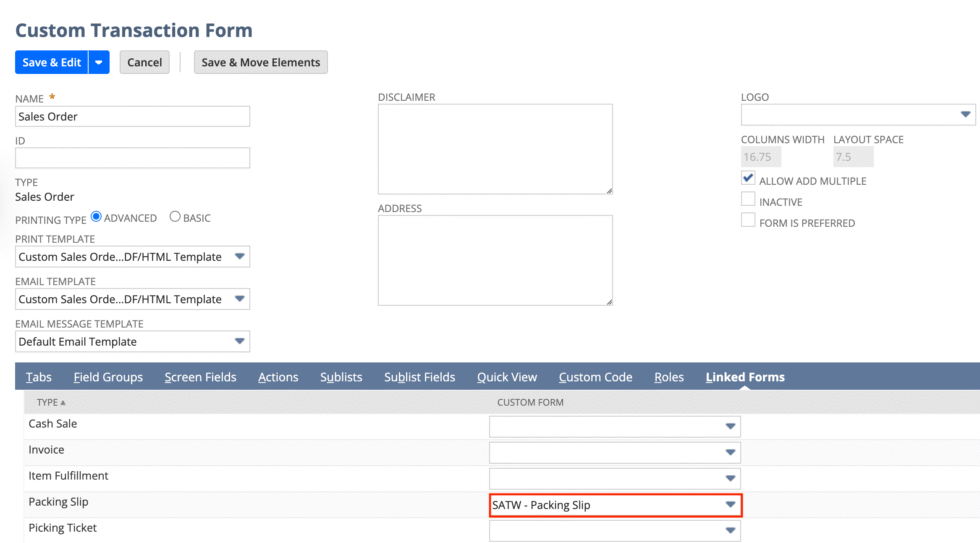
Each Sales Order form may reference a different Packing Slip template, increasing the importance of form validation during customization projects.
Individual Packing Slip Printing
Unlike printing an Invoice from an Invoice record, Individual Packing Slips are printed from the Item Fulfillment transaction. This relation to the Item Fulfillment can cause issues if working backward from the Item Fulfillment transaction form when trying to make an update to the Packing Slip.
Bulk Packing Slip Printing
Packing slips are also commonly printed in batches during warehouse fulfillment operations.
Navigate to: Transactions > Management > Print Checks and Forms > Print Packing Slips
Additional Packing Slip Configuration Considerations
Packing Slip functionality in NetSuite also includes system-wide settings that can affect output behavior independently from the template itself.
Print and Fax Preferences
Certain Packing Slip options can be configured globally through:
Setup > Company > Print and Fax
These settings may impact:
- Packing slip visibility
- Shipping information
- Print defaults
- Document behavior

Order Management Preferences
Additional fulfillment-related settings can be found under:
Setup > Accounting > Accounting Preferences > Order Management
Depending on business requirements, these settings may influence:
- Fulfillment processing
- Shipping document behavior
- Item display logic
- Default printing workflows

In many implementations, these preferences must be reviewed to achieve parity with the default functionality commonly available on invoice transactions.
Custom Field Management
Similar to the selection needed for a custom transaction field to populate on an invoice instead of a sales order, the invoice checkbox needs to be checked in the Applies To section on the custom field configuration page. The boxes for Sales Order and Item Fulfillment can both be selected, and a custom field still may not appear on the packing slip. This is because there is an explicit checkbox often overlooked, titled Print on Packing Slip, that will need to be selected for the field to successfully be sourced and printed on the packing slip.

Conclusion
Advanced PDF customization in NetSuite can vary significantly depending on the transaction type being modified. Invoice templates generally follow a direct and predictable configuration model, while Packing Slips introduce additional dependencies related to Item Fulfillment forms, warehouse workflows, and operational print processes.
Understanding how transaction forms, fulfillment records, and print configurations interact is essential for successful packing slip customization and long-term template maintenance.
About Suite Answers That Work
Suite Answers That Work is a NetSuite Solutions Provider with 30+ years of combined experience. We specialize in NetSuite implementation, optimization, integration, rapid project recovery, rescue services, and custom development.
Every business is unique, but with 40+ NetSuite clients over the last six years, our consultants have likely seen your challenge or created a similar solution.
If you would like more information about NetSuite, ERP optimization, or AI-enabled business process improvement, contact us today.