

Introduction
Electronic Data Interchange (EDI) implementations can appear complex, especially for consultants leading their first customer deployment. After completing Celigo’s B2B Manager training, one principle became immediately clear:
Successful EDI implementations are built on planning, not configuration.
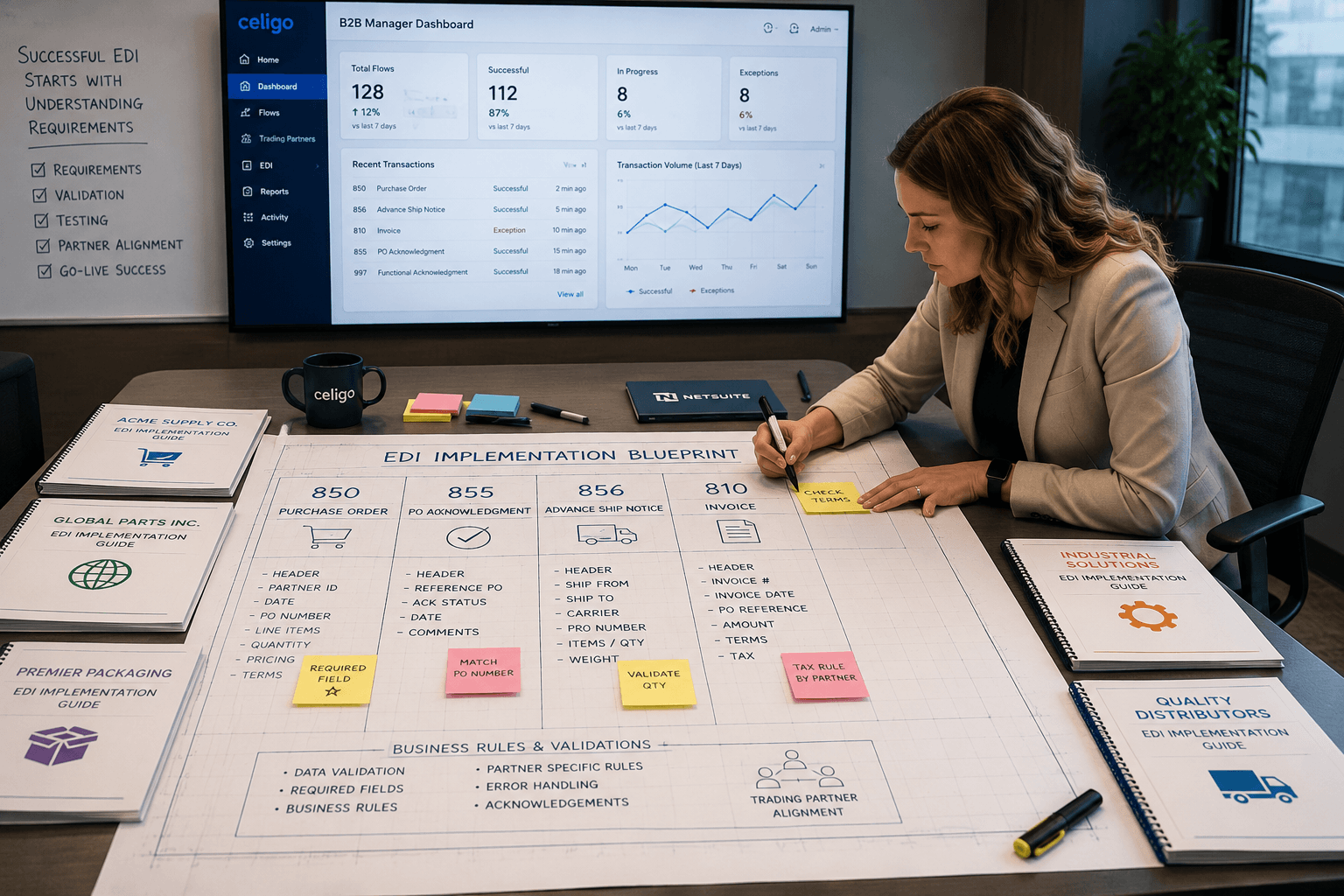
Many NetSuite consultants assume that implementing EDI is primarily a technical exercise involving data mapping, integration flows, and connectivity. While those components are certainly important, they represent only a portion of a successful implementation. The real work begins long before the first integration flow is created.
Why Planning Is the Most Important Phase of an EDI Implementation
Every trading partner has its own business requirements, even when they all follow the ANSI X12 standard. Two retailers may both exchange an EDI 850 Purchase Order, yet each can require different fields, validation rules, shipping expectations, acknowledgments, or communication methods.
Before configuring Celigo B2B Manager or creating a single mapping, consultants should thoroughly analyze each trading partner’s implementation guide.
Common variations include:
- Supported EDI transaction sets (850, 855, 856, 810, 846, 820, and others)
- Required and optional data elements
- Custom business rules and validation requirements
- Shipping, labeling, and packaging specifications
- Testing and certification procedures
- Communication protocols such as AS2, FTP, SFTP, or VAN
- Partner-specific document sequencing and acknowledgment requirements
Although these partners may all adhere to X12 standards, their implementation guides often differ significantly. Failing to identify those differences early can lead to rework, delayed testing, and unnecessary implementation costs.
The Biggest Lesson from Celigo B2B Manager Training
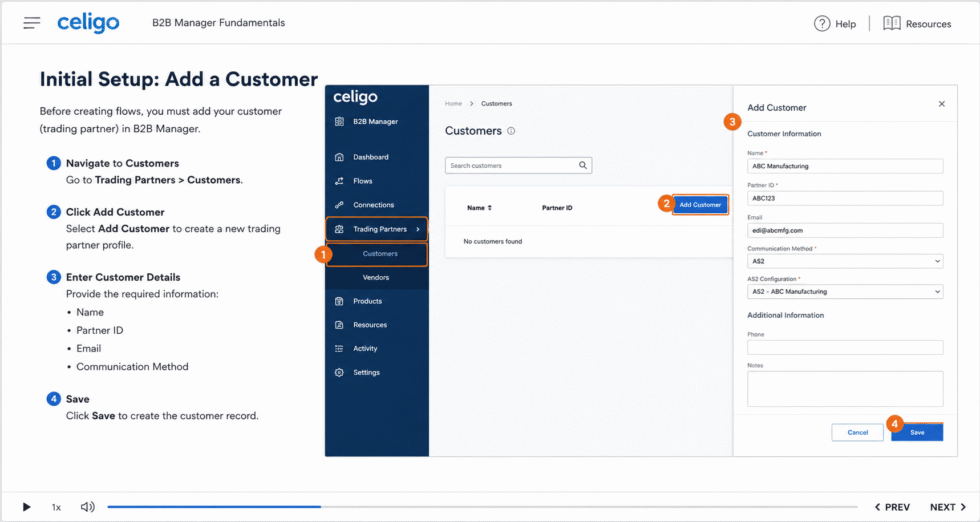
The single most valuable lesson from Celigo’s B2B Manager training is that understanding the customer’s business requirements is more important than building integrations quickly.
An experienced NetSuite consultant should begin every EDI project by reviewing each trading partner’s implementation guide and documenting:
- Required EDI transaction types
- Mandatory segments and elements
- Business process expectations
- Validation rules
- Exception handling requirements
- Testing milestones and certification criteria
Completing this analysis before configuration significantly reduces project risk and helps ensure the solution is designed correctly from the outset.
How Celigo B2B Manager Simplifies NetSuite EDI Implementations
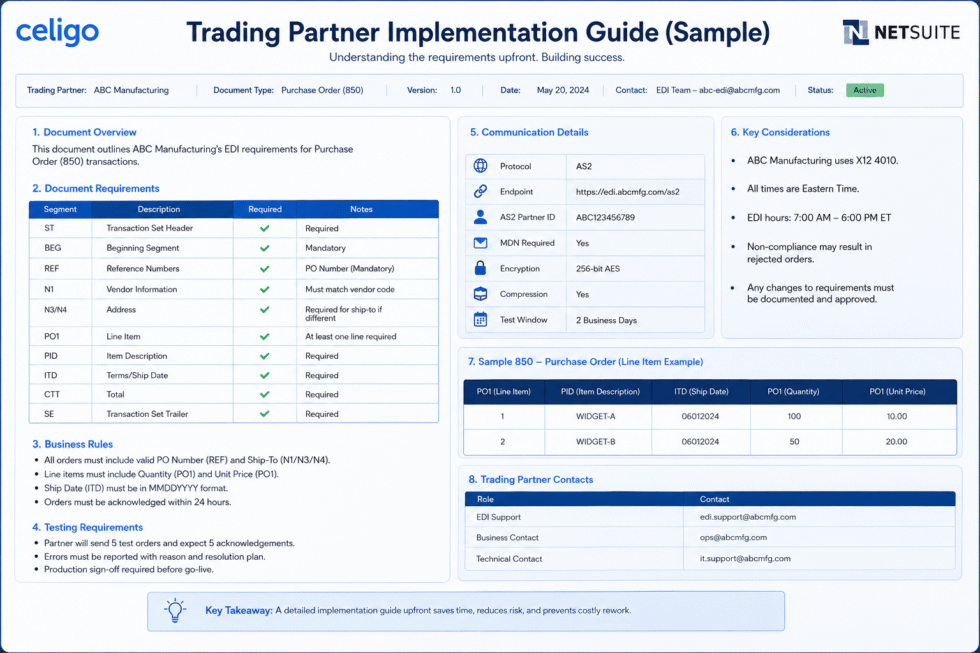
Once the planning phase is complete, Celigo B2B Manager streamlines the technical implementation by providing capabilities that reduce development effort and accelerate deployment.
Key features include:
- Prebuilt EDI templates
- Trading partner profile management
- Built-in EDI validation
- Native NetSuite integration
- Centralized monitoring and error management
- Standardized implementation framework
Rather than spending valuable project time building foundational infrastructure, consultants can focus on understanding customer requirements, configuring partner-specific business rules, and delivering a reliable EDI solution.
This consultative approach improves implementation quality while reducing project timelines and troubleshooting efforts.
Follow Celigo’s Official Installation Guide Before Configuration
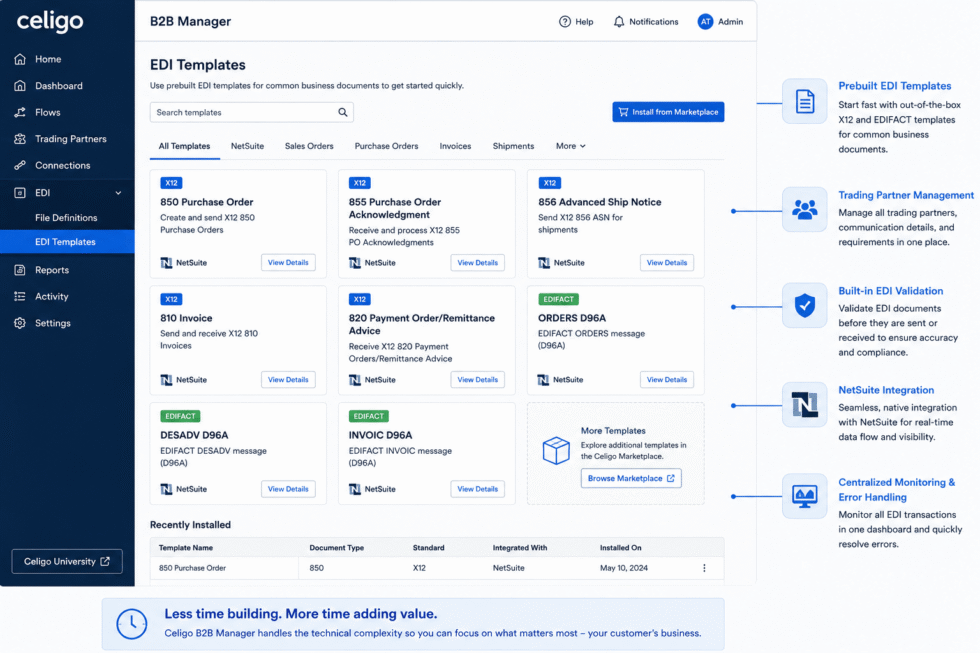
After you’ve completed your planning activities and documented your trading partner requirements, the next step is installing the NetSuite Order-to-Cash: EDI for B2B Manager (X12) template.
Celigo provides a comprehensive installation guide that walks consultants through the required setup process, including:
- Installing the required NetSuite SuiteBundle
- Creating or selecting a NetSuite connection
- Installing the Integrator.io SuiteApp
- Deploying the Order-to-Cash EDI template from the Marketplace
- Verifying the installation before configuration begins
Following the official installation sequence helps ensure that your environment is configured correctly before you begin creating trading partner profiles, modifying document definitions, or building partner-specific mappings.
You can access the official installation guide here:
Celigo Help Center – Install the NetSuite Order-to-Cash: EDI for B2B Manager (X12) Template from Marketplace
https://docs.celigo.com/hc/en-us/articles/28251891038107-Install-the-NetSuite-order-to-cash-EDI-for-B2B-Manager-X12-template-from-Marketplace
While the guide provides an excellent foundation for installing the solution, it is still important to validate the out-of-the-box configuration against your customer’s business requirements before moving into testing or production.
Don’t Assume the Default Configuration Is Production-Ready
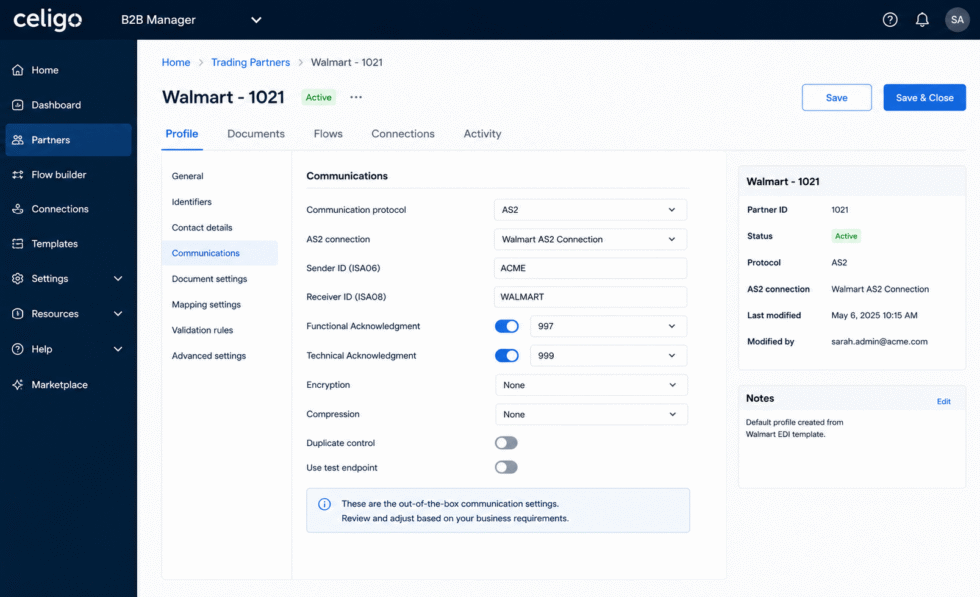
One important lesson learned during implementation is that Celigo B2B Manager’s out-of-the-box configuration is intended to provide a starting point, not a finished solution for every business.
While the prebuilt templates and default settings accelerate implementation, they may not fully align with your customer’s unique business processes or a trading partner’s implementation guide. Differences in document requirements, validation rules, communication protocols, acknowledgments, or custom business logic often require additional configuration before moving to testing or production.
Before building integrations, verify that the default configuration supports your specific implementation by reviewing:
- Trading partner profile settings
- Document definitions and transaction types
- Validation and business rule configuration
- Communication protocols (AS2, FTP, SFTP, or VAN)
- Required acknowledgments (997, 999, etc.)
- Partner-specific mappings and workflow behavior
If the standard configuration does not meet your customer’s requirements, adjust the settings as needed before continuing with development. And if you’re unsure whether a configuration should be modified—or you encounter unexpected behavior—don’t hesitate to engage Celigo Support early in the project.
Resolving configuration questions during the planning phase is far more efficient than discovering issues during User Acceptance Testing (UAT) or after deployment. Taking the time to validate the platform’s configuration against the customer’s business requirements helps reduce rework, shortens implementation timelines, and contributes to a more successful NetSuite EDI implementation.
Best Practices for a Successful NetSuite EDI Project
Whether implementing EDI for a single trading partner or managing dozens of vendor relationships, following a structured methodology dramatically increases project success.
Before beginning configuration, make sure you:
- Review every trading partner implementation guide
- Document all required transaction types
- Identify partner-specific business rules
- Confirm communication protocols and connectivity requirements
- Define testing and certification expectations
- Validate customer business processes before building integrations
Treating the implementation guide as the project’s blueprint minimizes surprises during User Acceptance Testing (UAT) and creates a more scalable EDI environment.
Conclusion
Technical configuration is only one component of a successful NetSuite EDI implementation. The greatest value a consultant brings to an EDI project is understanding how each trading partner conducts business and translating those requirements into a well-designed integration strategy.
Celigo B2B Manager provides the tools to simplify implementation, but successful projects begin with thoughtful planning, detailed requirements gathering, and a deep understanding of each trading partner’s implementation guide.
Organizations that invest time in planning before configuration experience smoother deployments, fewer testing issues, reduced rework, and stronger long-term EDI partnerships. As with many successful ERP implementations, the foundation established during project planning ultimately determines the success of the entire solution.
About Suite Answers That Work – A Rotation Digital Company
Suite Answers That Work is a NetSuite Solutions Provider with more than 30 years of combined experience. We specialize in NetSuite implementation, optimization, integration, rapid project recovery, rescue services, and custom development.
Every business is unique, but with more than 40 NetSuite clients over the last seven years, our consultants have likely seen a similar challenge or helped create a similar solution.
For more information about NetSuite, ERP optimization, or AI-enabled business process improvement, contact us today.