


Introduction
Global business expansion introduces operational complexity that extends far beyond sales and procurement. One of the most critical areas impacted is financial management, particularly multi-currency accounting.
Organizations operating across regions must manage transactions, subsidiaries, vendors, customers, and reporting in multiple currencies while maintaining compliance with accounting standards such as ASC 830 and IAS 21. NetSuite addresses these challenges through its native Multi-Currency Management framework, enabling organizations to automate currency translation, foreign exchange (FX) revaluation, consolidated reporting, and intercompany accounting.
This article explores how multi-currency accounting works in NetSuite, key architectural concepts, implementation considerations, and best practices for finance and ERP teams.
Understanding Multi-Currency Accounting
Multi-currency accounting refers to the ability of an ERP system to:
- Record transactions in different currencies
- Convert amounts into a company’s base currency
- Track realized and unrealized foreign exchange gains/losses
- Consolidate subsidiaries operating in different currencies
- Produce compliant financial statements
Without automation, organizations often rely on spreadsheets and manual exchange rate calculations, introducing reconciliation issues, reporting delays, and audit risks.
NetSuite centralizes these processes within a unified financial architecture.
Core Currency Concepts in NetSuite
Before implementing multi-currency functionality, it is important to understand NetSuite’s currency hierarchy.
1. Base Currency
Each NetSuite subsidiary has a single base currency.
Examples:
- US subsidiary → USD
- UK subsidiary → GBP
- Canadian subsidiary → CAD
The base currency is the primary reporting currency for that subsidiary and cannot be changed after transactions are entered.
Key Implications
- General Ledger (GL) balances are maintained in the subsidiary base currency
- Financial statements are generated in the base currency
- FX revaluation processes adjust balances against the base currency
2. Transaction Currency
Transaction currency represents the currency used on a customer invoice, vendor bill, purchase order, or sales order.
Example:
- US subsidiary base currency = USD
- Customer invoice issued in EUR
NetSuite stores:
- Original foreign currency amount
- Exchange rate
- Converted base currency amount
This preserves auditability while enabling accurate reporting.
3. Reporting Currency
Organizations may require reporting in additional currencies for:
- Parent company reporting
- Investor reporting
- Regional management reporting
NetSuite OneWorld supports consolidated exchange rate management and translated reporting across subsidiaries.
Enabling Multi-Currency in NetSuite
Multi-currency functionality is enabled through:
Setup → Company → Enable Features → Company → Multiple Currencies

For OneWorld accounts:
- Subsidiaries
- Currency Management
- Multi-Book Accounting
- Automated Intercompany Management
are commonly enabled together.
Once activated:
- Currency records become available
- Exchange rate tables are maintained
- Customers/vendors can transact in assigned currencies

Exchange Rate Management
Exchange rates drive all foreign currency conversions in NetSuite.
Types of Exchange Rates
NetSuite uses several exchange rate categories:
| Rate Type | Purpose |
|---|---|
| Current Rate | Balance sheet translation |
| Average Rate | Income statement translation |
| Historical Rate | Equity account translation |
These are especially important during consolidated financial reporting.
Updating Exchange Rates
Exchange rates may be:
- Entered manually
- Imported via CSV
- Integrated through external FX providers
- Automated through SuiteScript or middleware
Most organizations schedule daily exchange rate updates.
Best Practice
Maintain a controlled approval process for FX rate imports to ensure SOX compliance and audit integrity.
Foreign Currency Transactions
When a foreign currency transaction is created:
- User selects transaction currency
- NetSuite retrieves applicable exchange rate
- System calculates base currency equivalent
- GL impact posts in subsidiary base currency
For example:
| Transaction | Value |
| Invoice Currency | EUR |
| Invoice Amount | €10,000 |
| Exchange Rate | 1.10 |
| Base Currency | USD |
| GL Posting | $11,000 |
The original foreign currency value remains attached to the transaction for settlement and reporting.
Realized vs Unrealized FX Gain/Loss
One of the most important aspects of multi-currency accounting is handling exchange rate fluctuations.
Unrealized FX Gain/Loss
Occurs when:
- Open foreign currency transactions remain unpaid
- Exchange rates change before settlement
Example:
- Invoice booked at 1.10
- Month-end rate changes to 1.15
- NetSuite recalculates open balance exposure
The difference is posted as an unrealized gain or loss.
NetSuite Process
Transactions → Financial → Revalue Open Currency Balances
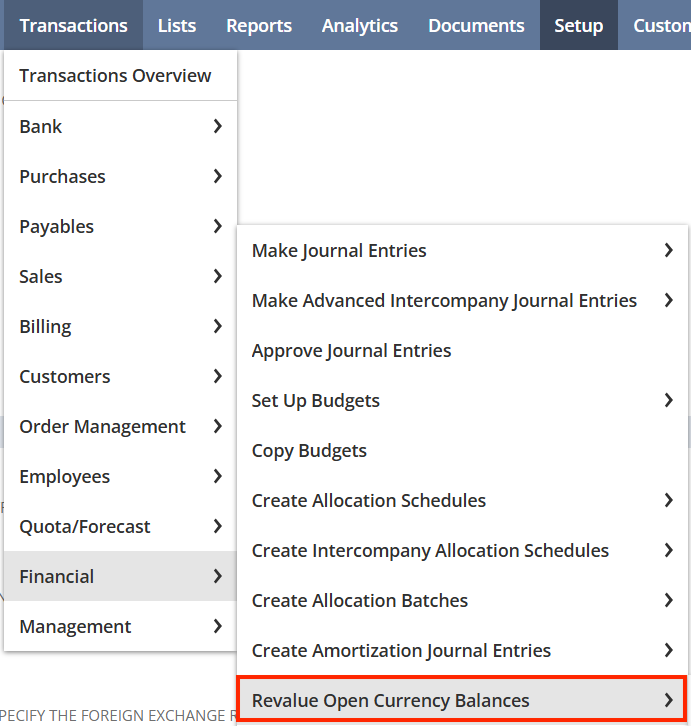
NetSuite automatically:
- Revalues open AP/AR balances
- Creates adjusting journal entries
- Reverses entries in the next accounting period

Realized FX Gain/Loss
Occurs when:
- Foreign currency transaction is settled
- Actual payment rate differs from original transaction rate
Example:
- Invoice booked at 1.10
- Payment received at 1.20
- Difference becomes realized FX gain
NetSuite automatically posts realized gain/loss entries during payment processing.
Multi-Subsidiary and Consolidation Architecture
NetSuite OneWorld enables global consolidation across subsidiaries operating in different currencies.
Example Structure
| Subsidiary | Base Currency |
| US Parent | USD |
| UK Subsidiary | GBP |
| Germany Subsidiary | EUR |
| Japan Subsidiary | JPY |
NetSuite automatically:
- Translates subsidiary financials
- Applies consolidated exchange rates
- Eliminates intercompany balances
- Produces consolidated reporting
Currency Translation in Consolidation
During consolidation:
- Balance sheet accounts use current rates
- Income statement accounts use average rates
- Equity accounts use historical rates
This aligns with GAAP and IFRS translation standards.
NetSuite stores translated balances separately from transactional balances, preserving accounting traceability.
Intercompany Transactions and FX
Global organizations often transact between subsidiaries in different currencies.
Example:
- US entity invoices UK entity
- Transaction occurs in USD
- UK subsidiary base currency is GBP
NetSuite can automate:
- Intercompany journal entries
- Currency conversions
- Elimination entries
- Settlement workflows
This significantly reduces manual accounting effort.
Multi-Book Accounting Considerations
Organizations operating under multiple accounting standards may combine:
- Multi-Currency
- Multi-Book Accounting
Example:
- Primary Book → US GAAP
- Secondary Book → IFRS
Each accounting book may:
- Use different exchange rate treatments
- Maintain separate revaluation logic
- Produce distinct financial statements
This is especially useful for multinational enterprises.

Common Implementation Challenges
1. Incorrect Base Currency Design
Changing base currencies after go-live is extremely difficult.
Recommendation
Design subsidiary structures carefully before implementation.
2. Exchange Rate Governance
Inconsistent FX rates create reconciliation issues.
Recommendation
Automate exchange rate sourcing and lock approval workflows.
3. Intercompany Reconciliation Complexity
Cross-currency intercompany balances can become difficult to reconcile.
Recommendation
Use Automated Intercompany Management (AIM) where possible.
4. Reporting Inconsistencies
Organizations sometimes confuse:
- Transaction currency
- Base currency
- Reporting currency
Recommendation
Establish clear finance reporting standards early in the project lifecycle.
Performance and Reporting Best Practices
Use Saved Searches Carefully
Large multi-currency datasets can affect performance.
Optimize by:
- Filtering subsidiaries
- Limiting historical transaction ranges
- Avoiding excessive formula fields
Standardize Currency Precision
Differences in decimal precision can create reconciliation variances.
Recommendation
Standardize rounding methodologies across integrations and subsidiaries.
Schedule Revaluation Jobs Strategically
FX revaluation can be resource-intensive in large environments.
Recommendation
Run revaluation during off-peak hours and validate close process sequencing.
Audit and Compliance Benefits
NetSuite provides strong auditability for global accounting operations.
Key capabilities include:
- Historical exchange rate tracking
- FX adjustment journals
- System-generated audit trails
- Role-based approval workflows
- Segregation of duties support
This simplifies:
- External audits
- SOX compliance
- Financial close management
Conclusion
Multi-currency accounting is no longer optional for organizations operating globally. As transaction volumes increase and reporting requirements become more complex, finance teams need systems capable of automating currency translation, FX revaluation, consolidation, and intercompany accounting.
NetSuite’s native multi-currency framework provides a scalable architecture for multinational operations while maintaining accounting accuracy and regulatory compliance.
When implemented correctly, organizations gain:
- Faster financial close cycles
- Improved reporting accuracy
- Reduced manual reconciliation effort
- Better visibility into global operations
- Stronger financial governance
For ERP architects, finance leaders, and NetSuite administrators, understanding the underlying mechanics of multi-currency accounting is essential for building scalable global financial operations.
About Suite Answers That Work
Suite Answers That Work is a NetSuite Solutions Provider with 30+ years of combined experience. We specialize in NetSuite implementation, optimization, integration, rapid project recovery, rescue services, and custom development.
Every business is unique, but with 40+ NetSuite clients over the last six years, our consultants have likely seen your challenge or created a similar solution.
If you would like more information about NetSuite, ERP optimization, or AI-enabled business process improvement, contact us today.