


What is NetSuite Planning and Budgeting (NSPB)
Implementing NetSuite Planning and Budgeting (NSPB) is more than a software configuration project. For many organizations, it is a chance to replace spreadsheet-driven budgeting with a more collaborative, controlled, and scalable planning process.
NSPB helps finance teams support budgeting, forecasting, scenario modeling, workforce planning, reporting, and long-range planning while staying connected to NetSuite ERP data. But a successful implementation requires preparation before configuration begins.
Before starting an NSPB implementation, organizations should review licensing, clean up NetSuite ERP data, define planning dimensions, assign project roles, document budgeting workflows, and align stakeholders around the future-state planning process.
Licensing Considerations for NetSuite Planning and Budgeting (NSPB)
NetSuite Planning and Budgeting is typically licensed separately from core NetSuite ERP. Before beginning an implementation, confirm which NSPB capabilities are included in your subscription and whether your organization needs additional planning functionality such as Workforce, Capital, Projects, Strategic Modeling, Predictive Planning, or Smart View.
Licensing should be reviewed before project kickoff so the implementation team can design the planning model around the functionality available to your organization.
Helpful Resources
- NetSuite Planning & Budgeting Overview
https://www.netsuite.com/portal/products/erp/financial-management/financial-planning.shtml - NetSuite Learning Cloud Support (LCS) Training Catalog (subscription required)
https://www.netsuite.com/portal/services/training/suite-training/ns-planning-and-budgeting-standard.shtml
Prepare Your NetSuite Environment
A successful NSPB implementation starts with a well-maintained NetSuite ERP environment. Since planning models rely on your ERP data, taking time to review and clean foundational records before implementation can significantly reduce issues later in the project.
Areas to review include:
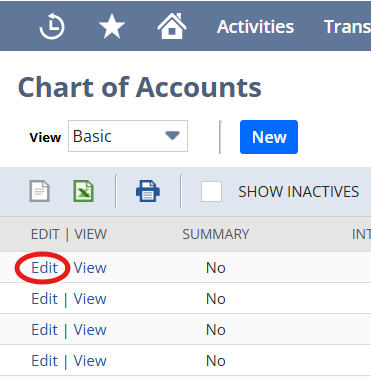
- Chart of Accounts
- Subsidiaries and consolidation structure
- Departments, classes, and locations
- Custom segments
- Accounting periods and fiscal calendars
- Historical actuals
- Existing NetSuite budgets
- Budget vs. actual reporting
- Allocation processes
- Currency and exchange rate considerations
- Data quality in the General Ledger
- Planning assumptions currently managed in Excel
Organizations with clean financial data typically experience smoother implementations and more reliable reporting.
Assemble the Right Project Team
NSPB implementations are most successful when they involve stakeholders from both Finance and IT. While technical resources configure integrations and security, Finance users provide the business knowledge needed to build meaningful planning models.
A typical implementation team includes:
- Executive Sponsor
- Project Manager
- Finance Lead
- NetSuite Administrator
- NSPB Implementation Consultant
- Department Budget Owners
- IT or Integration Specialists
Engaging key stakeholders early helps ensure the planning solution aligns with business processes and reporting requirements.
Understand Typical Implementation Timelines
Implementation timelines vary depending on the organization’s complexity, number of entities, planning requirements, and data quality.
A typical implementation may include:
| Phase | Typical Duration |
|---|---|
| Discovery & Requirements | 1 to 2 weeks |
| Environment Setup | 1 week |
| Data Integration & Validation | 2 to 4 weeks |
| Planning Model Configuration | 2 to 3 weeks |
| Business Rules & Reporting | 2 to 3 weeks |
| User Acceptance Testing | 1 to 2 weeks |
| Training & Go-Live | 1 week |
Most NSPB implementations take longer when organizations have multiple subsidiaries, currencies, complex allocations, inconsistent segment usage, or heavily customized budgeting workflows.
Common NSPB Implementation Mistakes and Misconceptions
Organizations new to NSPB often have unrealistic expectations about what the platform can do out of the box. Understanding these misconceptions early can help set realistic project goals.
“NSPB is just a budgeting tool.”
While budgeting is a core capability, NSPB also supports forecasting, scenario modeling, long-range planning, driver-based planning, reporting, dashboards, and predictive analytics.
“We can simply import our Excel budget, and we’re done.”
Migrating spreadsheets is only one part of the implementation. Successful projects also involve designing and planning dimensions, business rules, security, workflows, and reporting structures.
“Finance can implement NSPB without IT.”
Although Finance drives the planning process, technical expertise is typically required to configure integrations, security, metadata synchronization, and application administration.
“More planning dimensions always provide better reporting.”
Adding unnecessary dimensions can make the application harder to maintain. A streamlined dimensional model is often easier to use, performs better, and scales more effectively.
“NSPB will automatically fix our budgeting process.”
NSPB can improve planning, reporting, and collaboration, but it will not automatically solve unclear ownership, poor data quality, or undefined approval workflows. The best implementations start with process design before system configuration.
Review Existing NetSuite Budgets Before Implementing NSPB
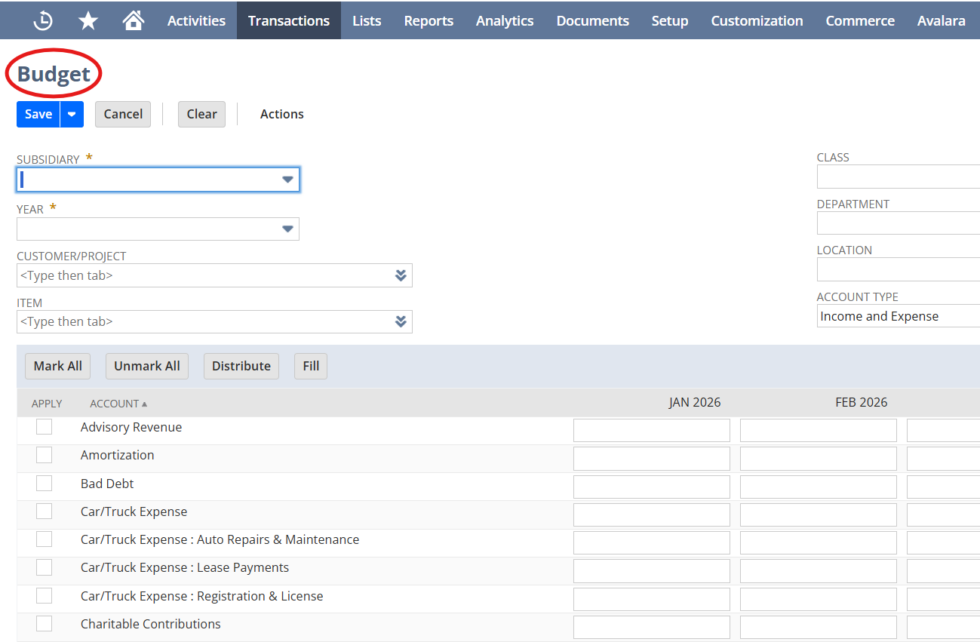
If your organization already uses NetSuite ERP budgets, review the current structure before moving into NSPB. Existing budgets can provide useful historical context, but they may also reflect outdated processes, inconsistent department ownership, manual spreadsheet workarounds, or reporting limitations.
Before migration, evaluate whether current budgets align with the future planning model. In many cases, NSPB is not simply a replacement for NetSuite ERP budgets. It becomes the system for planning, forecasting, scenario modeling, and collaborative budget ownership, while NetSuite ERP remains the system of record for actual financial results.
Build a Strong Foundation First
Organizations that invest time upfront in planning and preparation often experience faster implementations and greater user adoption. Before configuration begins, make sure you can answer the following questions:
- Are your financial records clean and well organized?
- Is your Chart of Accounts ready for planning?
- Have planning participants been identified?
- Are budgeting workflows clearly defined?
- Have reporting requirements been documented?
- Is executive sponsorship in place?
- Have implementation goals and success metrics been established?
Answering these questions before the project begins can help reduce implementation risk and create a smoother path to a successful go-live.
Additional Learning Resource
If you’re new to NetSuite Planning and Budgeting, this resource provides an excellent foundation before beginning your implementation:
- NetSuite Planning and Budgeting: Full Demo & Key Features (YouTube)
https://www.youtube.com/watch?v=UPHetAUvL3k
Conclusion
A successful NetSuite Planning and Budgeting (NSPB) implementation is measured not by how quickly it goes live, but by how well it improves financial planning and decision-making. When implemented correctly, NSPB transforms budgeting from a spreadsheet-driven process into a collaborative platform for forecasting, scenario modeling, workforce planning, and long-term strategic planning.
Achieving that value requires more than software configuration. Success depends on a clear implementation strategy, clean ERP data, thoughtful model design for planning, executive sponsorship, and strong collaboration among Finance, IT, and business stakeholders. Investing in a solid foundation reduces project risk, accelerates user adoption, and creates a scalable planning solution that can grow with your organization.
Whether you’re replacing spreadsheets or implementing a broader Enterprise Performance Management (EPM) strategy, careful planning upfront will deliver lasting value well beyond go-live.
Partner with QueBIT for Your NSPB Implementation
Implementing NetSuite Planning and Budgeting is both a technical and strategic initiative.
At QueBIT, our NetSuite and Enterprise Performance Management consultants help organizations:
- Assess readiness and build an implementation roadmap
- Design scalable planning models and dimensions
- Configure NSPB applications, business rules, workflows, and security
- Integrate NetSuite ERP data and validate metadata
- Develop reports, dashboards, and planning insights
- Train users and drive successful adoption
- Optimize NSPB through ongoing enhancements

Whether you’re implementing NSPB for the first time, expanding into Workforce or Capital Planning, or optimizing an existing deployment, QueBIT can help you maximize your investment.