


Introduction: Closing Accounting Periods in NetSuite
Closing accounting periods in NetSuite is a critical step in maintaining accurate financial records and ensuring compliance. NetSuite provides a built-in Period Close Checklist that guides accounting teams through a structured, auditable close process.
To access the checklist, navigate to:
Setup > Accounting > Manage Accounting Periods
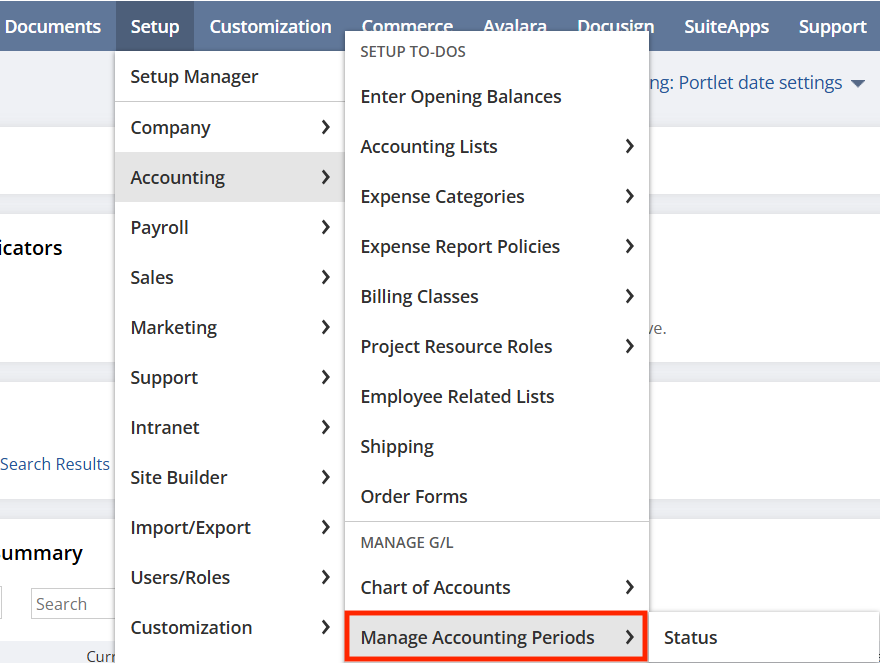
From there, select the desired period and click the Checklist icon.
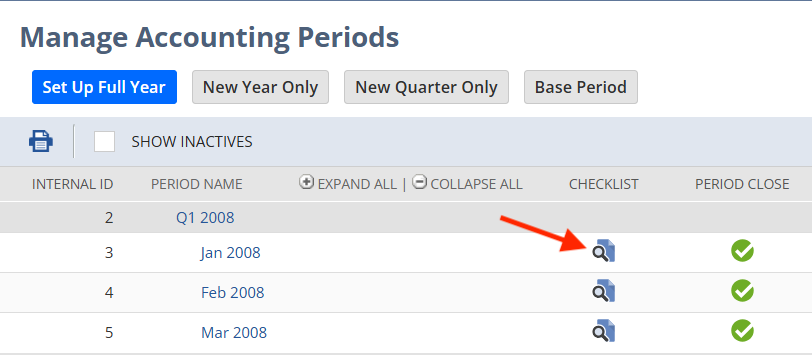
This launches a step-by-step workflow designed to help users close the books efficiently and accurately in NetSuite.
NetSuite Period Close Checklist: Standard Workflow
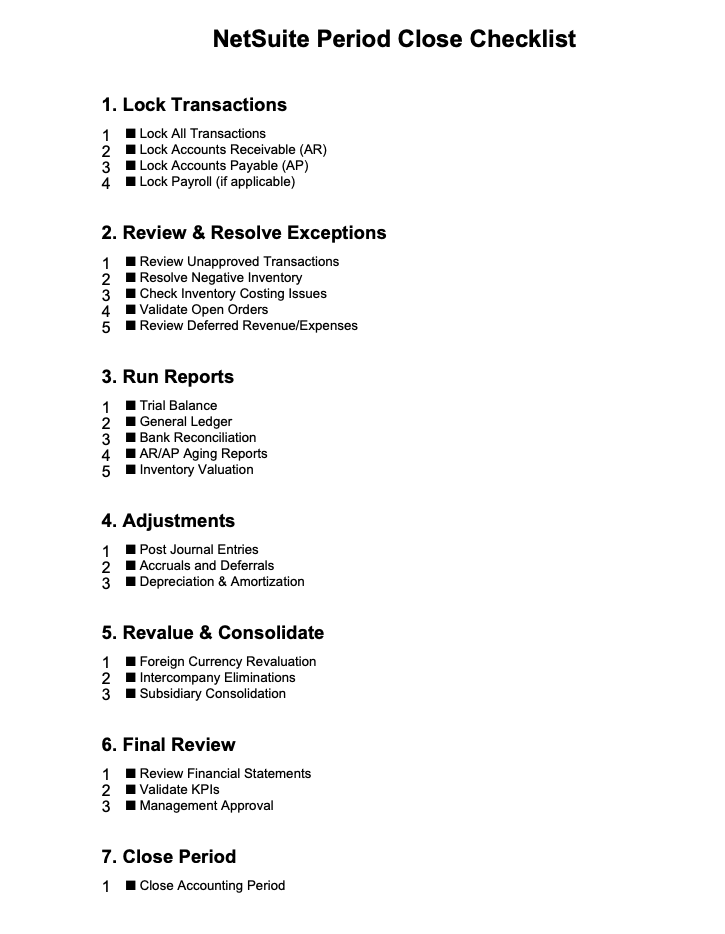
The NetSuite Period Close Checklist is a pre-configured framework that ensures all required tasks are completed before a period is closed.
Key Features
- Sequential task completion (top-down workflow)
- Built-in controls and dependencies
- User activity tracking and audit trail
- Standardized accounting processes
Typical Tasks Include
- Locking AR, AP, and GL transactions
- Reviewing and resolving exceptions
- Running financial reports
- Finalizing and closing the period
Each step logs:
- The user responsible
- The completion timestamp
- The status of the task
This makes NetSuite an excellent tool for organizations needing audit-ready financial close processes.
Limitations of the NetSuite Close Process
While the standard checklist works well for many companies, it can be too rigid for more complex accounting environments.
Common Challenges
- Limited flexibility for custom workflows
- Difficulty incorporating non-standard processes (e.g., commissions, revenue adjustments)
- Reliance on manual tracking outside of NetSuite
- Lack of customization for industry-specific requirements
Businesses with unique operational needs often require a more customized NetSuite period close process.
Customizing the NetSuite Period Close Process
Real-World Use Case: Sales-based Pay Tracking
In one client scenario, the accounting team needed to integrate a sales-based calculation process into their NetSuite period close.
This required:
- Tracking exceptions related to serialized inventory
- Accurately calculating sales-based pay per transaction
- Coordinating multiple manual steps across teams
Phase 1: Process Documentation & Training
The initial solution focused on:
- Improving internal documentation
- Training users on manual workflows
- Standardizing procedures across the accounting team
While helpful, this approach still relied heavily on manual effort and external tools.
Phase 2: NetSuite Automation & Customization
To improve efficiency and scalability, a more advanced solution was implemented using NetSuite-native capabilities:
Tools Used
- Custom Records to track closed tasks and statuses
- Saved Searches to identify exceptions and required actions
- Workflows to guide users through the close process
- SuiteScript for automation and validation
- Cloud integrations where necessary
Results
- Extended the NetSuite Period Close Checklist with custom steps
- Centralized all closed activities in NetSuite
- Reduced reliance on spreadsheets
- Improved audit visibility and compliance
- Enabled a repeatable, scalable close process
This approach allowed users to follow a NetSuite-like checklist experience while incorporating business-specific requirements, such as commissions.
Leading Practices for Closing Periods in NetSuite
To optimize your NetSuite financial close process, consider the following:
- Use the native Period Close Checklist as your foundation
- Identify gaps where manual processes exist
- Leverage custom records and workflows for flexibility
- Automate repetitive tasks using SuiteScript
- Maintain a clear audit trail, NetSuite
- Continuously refine your close process
Conclusion: Standard vs. Custom NetSuite Close Processes
NetSuite provides a powerful, structured approach to closing accounting periods. However, many organizations benefit from extending this functionality to meet their unique needs. Whether you rely on the standard checklist or build a customized solution, the objective remains the same: Close periods faster, more accurately, and with full visibility in NetSuite. By combining NetSuite’s native features with smart customization, businesses can create a financial close process that is both efficient and scalable.
About Us
We are a NetSuite Solutions Provider with 30+ years of combined experience. We specialize in implementation, optimization, integration, rapid project recovery and rescue, and custom development to meet any business need. Although every business is unique, with 40+ NetSuite clients over the last 6 years, our NetSuite Consultants have most likely seen your challenge or created a similar solution. If you would like more information on NetSuite or just have questions on your project, feel free to contact usHere.